 |
We used jGRASP in a recent Introduction to Coding with Java class. It is not a production type IDE such as Netbeans or Eclipse but we have found it a good tool for introductory classes aimed more at casual users, beginning computer science students, etc. It has a lot of interesting features such as generation of UML diagrams, an interactions pane like the Visual Basic immediate window, object viewers, side by side columns for editing multiple class files, etc. It is lightweight and very quick to load. It will also handle Python, C, etc. But we have not yet explored that in any depth. Although we have used it for simple Python scripts. On the downside it does not have a "smart editor" with intellisense type capabilities beyond simple syntax highlighting. |
Showing posts with label jva101. Show all posts
Showing posts with label jva101. Show all posts
Monday, April 17, 2017
jGrasp IDE

Friday, April 14, 2017
Instantiate a subclass in Java
The following code actually instantiates the project manager subclass of the employee detail superclass. It inputs the manager's id, name, etc. and then instantiates a project manager passing the variables just input to the subclass constructor which in turn invokes the superclass constructor.
This concludes the initial version of the programs and screenshots for the JVA101 Introduction to coding class. There is another lesson dealing with error handling (exceptions) which we may add in the future.
This concludes the initial version of the programs and screenshots for the JVA101 Introduction to coding class. There is another lesson dealing with error handling (exceptions) which we may add in the future.
 |
| Click to view expanded image on box.com |
Java subclasses
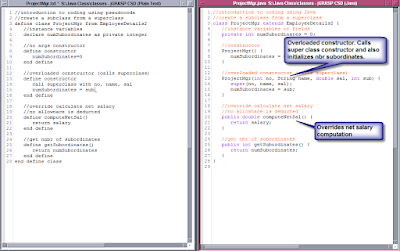
A class can inherit from a parent or superclass. This is done in Java with the extends keyword. The following snippets create a ProjectManager subclass from the EmployeeDetails superclass. Note that the subclass invokes code from the superclass using the super keyword. It also overrides the compute salary method.
 |
| Click image to view expanded image on box.com |
Using Java Constructors
Here is the code that instantiates an object form the prior EmployeeDetail2 class. It inputs an employee id. If the id is 0 it invokes the no argument constructor, otherwise it inputs the name and salary and invokes the constructor that takes arguments. On another note I forgot to mention that having multiple constructor with the same name is called overloading. We will see this same term later with methods.

Java constructor
This is the Java EmployeeDetails class with a constructor, Constructors are used to initialize the instance variables in an object when an object is instantiated form a class. If no arguments are passed in to the constructor then a no args constructor is applied. If the programmer does not supply a no args constructor then Java initializes the instance variables to default settings defined by their data type. You can have multiple constructors with the same name but their signatures must differ in the number of arguments passed.
 |
| Click on the image for an expanded view on box.com. |
Java Object
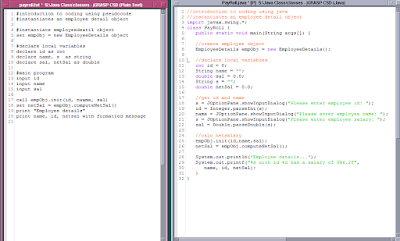
Here is the code that instantiates an employee detail object and uses it to compute the employee's net salary. Click on the image for an expanded view.
Java Classes and Objects
Here is the code for creating a Java class. This will create an employee detail class. Note the class has a private method which computes the allowance. This is used by the method which computes and returns the salary. There are also two methods to set and retrieve instance variables. These are sometimes called setters and getters.
In a later post we will instantiate an object from this class. We will resume our parallel Python files when we return to working on the Python course. Click on the image for an expanded view of the Java class on box.com.

In a later post we will instantiate an object from this class. We will resume our parallel Python files when we return to working on the Python course. Click on the image for an expanded view of the Java class on box.com.
Monday, April 10, 2017
Builtins
Just finished the section on using builtins. I fudged a little as in Python I used string slicing instead of a substring function as in Java. This is kind of a cool feature in Python array handling. For example to pickup the first character in a person's name in Java I used
String empEMail = empFName.substring(0,1);
Whereas in Python the code was
empEMail = empFName[:1]
Which means everything before the character at index 1.
Click on the image below to see an expanded view of the three columns on box.com with pseudocode, Java and Python.

String empEMail = empFName.substring(0,1);
Whereas in Python the code was
empEMail = empFName[:1]
Which means everything before the character at index 1.
Click on the image below to see an expanded view of the three columns on box.com with pseudocode, Java and Python.
Saturday, April 8, 2017
JAV101 Java Course Link
Here is the link to our Java course. I should have posted it before,
JVA101 Introduction to Programming using Java
JVA101 Introduction to Programming using Java
Java Programming Courseware
Below is the outline for our Introduction to Programming with Java Course (JVA101). This is a one day class designed to give the student an introduction to programming concepts using the Java language as the teaching vehicle. The courseware is from Logical Operations. Each student in our classes will receive one of these manuals.
Lesson 1: Introduction to Programming
Topic 1A: Overview of Programming
Topic 1B: Introduction to the Software Development Life Cycle
Lesson 2: Creating Simple Programs
Topic 2A: Work with Variables
Topic 2B: Work with Operators
Topic 2C: Control Program Execution
Topic 2D: Work with Arrays
Lesson 3: Creating Programs Using Methods
Topic 3A: Create Methods
Topic 3B: Work with Built-in Methods
Lesson 4: Implementing the Object-Oriented Methodology
Topic 4A: Create a Class
Topic 4B: Create an Object
Topic 4C: Create a Constructor
Topic 4D: Create a Subclass
Lesson 5: Handling Programming Errors
Topic 5A: Fix Syntax Errors
Topic 5B: Fix Logical Errors
Topic 5C: Fix Runtime Errors
The following is the link to the manual in their course catalog.
Friday, April 7, 2017
Methods in Java and functions in Python
We were bound to hit a few bumps in the road in developing our Python class using the Java manual as an outline. We are at the start of chapter three. There are five chapters in all. At this point the Java manual discusses using methods. Since we have not yet gotten to classes (which aren't formally discussed until chapter 4) we are substituting functions in our Python material at this point. We can discuss methods later when we get to chapter four. Below is the thumbnail of the three column (pseudocode, java, python) screenshot on box.com.

Tuesday, April 4, 2017
Java arrays and Python lists
We used lists for our Python class to correspond to Java arrays. Python does have arrays but lists are actually closer to Java arrays. Our examples show both single dimensional and two dimensional arrays and lists. We processed the arrays using for loops to compute sums. Again, note that the Python syntax iterates over a range. Click on the image below to see an expanded image on box.com.

Sunday, April 2, 2017
Loops in Java and Python
Below are the basic looping statements in Java and Python. Java has three: while, do...while and for, Python has two: while and for. But not do...while, although there are ways to accomplish the same thing. Also Python has an interesting approach to the for statement, sometimes called a for each. It iterates over a sequence selecting each element in turn. In the example below if counter is 15 it will iterate over i from 1 through 15.
for i in range(1,counter+1):
sum = sum + i;
On another note I decided I would I put the code for the Python scripts in a function and then called the function. This is more similar to Java which requires the existence of a class with a main() method. See the example below. It basically checks to see if the script being run is the main program, not an import.
def Loops():
counter = 10
i = 1
while i <= counter:
print("i = {}".format(i))
i = i + 1
if __name__ == "__main__":
Loops()
Click on the image below to see the code for the various loops.

for i in range(1,counter+1):
sum = sum + i;
On another note I decided I would I put the code for the Python scripts in a function and then called the function. This is more similar to Java which requires the existence of a class with a main() method. See the example below. It basically checks to see if the script being run is the main program, not an import.
def Loops():
counter = 10
i = 1
while i <= counter:
print("i = {}".format(i))
i = i + 1
if __name__ == "__main__":
Loops()
Click on the image below to see the code for the various loops.
Saturday, April 1, 2017
Switch statement in Java and equivalent in Python
Here is another Java/Python comparison. This one for the switch statement in Java. I used elif in Python to keep it simple for beginners. Click on the image to see an expanded version on box.com.

Java and Python if statements comparison
Here is a comparison of Java and Python for the if statement. We are preparing our Python scripts to parallel (at least as much as possible) the Java class from Logical Operations. So we may as well publish them for our reference as well as anyone else who might be interested. It also includes the pseudocode. See screenshots on box.com.

Subscribe to:
Posts (Atom)