Showing posts with label project management. Show all posts
Showing posts with label project management. Show all posts
Wednesday, October 11, 2017
We finished out Project Libre course. The first will run Saturday, November 18, in San Juan Capistrano. We were able to pretty much replicate our standard Microsoft Project Basic course. There were some features that Project Libre lacked but for the most part it does, in fact, provide the expected capabilities. It also uses the ribbon so the interface is familiar. You can see the slide deck for the course below. It is based on our similar Microsoft Project course. Note we have since renumbered the course as PRJ111XL.

Tuesday, October 10, 2017
Microsoft Project Accelerated
We have found many of our clients for Microsoft Project training that are in construction make little use of the features Microsoft makes available for resource management. So we created an accelerated course that does not go into resources in depth. And shortens a few other topics as well. This compresses the standard two day course sequence into a single day. We taught the first class a couple weeks ago in San Juan Capistrano and found it a good fit for these students. Below is the slide deck from SlideShare.
Sunday, May 7, 2017
Project Libre Tutorial
The following is a simple little Project Libre tutorial you may find useful. It has 5 parts. It just takes a few minutes per part.
Project Libre Tutorial
Project Libre Tutorial
Tuesday, May 2, 2017
Project Libre Resource View
Below is a screenshot of the of the resource sheet views in both Microsoft Project and Project Libre. As can be seen they are virtually identical. We will cover the Project Libre resource sheet in more detail in later posts in this series. The green shading in the Libre view means that the resources have been assigned in this project. Note that the screenshots are both of the same ".mpp" file. Project Libre can read and write Microsoft Project files.
 |
| Click to expand view on box.com |
Saturday, April 29, 2017
Project Libre
We are preparing a new Project course based on Project Libre. This is free, open-source project management software that can read and write Microsoft Project files. Our course will parallel our Microsoft Project courses as much as possible. I will try to post our slides and/or comparison slides as we go along. This should prove interesting to those interested to see how compatible they are. Click the image below to see an expanded version on box.com. It shows the basic Gantt Chart view of Project Libre compared to Microsoft Project.

Using Microsoft Project for Agile Projects
You CAN use use Microsoft Project for Agile projects. While it may not be the ideal tool it can be done if you use custom fields and filters, etc. Below is a link from mpug.com that shows how. Lynda.com also has a video by Bonnie Biafore that shows how. Again making use of custom fields.
Anna Forss has a different take. Check out the link below. She works with the calendars and options.
Please note this is not an argument for or against the Agile methodology versus waterfall. I am just pointing out a couple of useful links. Most of our Microsoft Project clients have been in the construction industry which uses waterfall. On the other hand we see little interest in waterfall from software development, especially web, groups. They much prefer Agile methodologies, with Scrum seeming the most popular. In my opinion the choice of a methodology depends on the project and the domain. There is no one answer as to which is "best".
Thursday, April 27, 2017
Students are often confused by the MPx and xPM Extreme Project management approaches. The following two links may shed some light on this. The first is a link to an article by Wysocki on the Extreme and Emertxe Project Management Models. These are two models used when solution paths are unclear. The second is a good blog post which summarizes the 5 life cycle approaches. It is based on experiences in the construction industry. As such the Extreme models are not used but the article does discuss them including the xPM and MPx approaches.
xPM and MPx Project Management Models
Blog Summary of 5 Project Management Life Cycles
xPM and MPx Project Management Models
Blog Summary of 5 Project Management Life Cycles
Friday, April 7, 2017
Changing Timescale in Project Libre
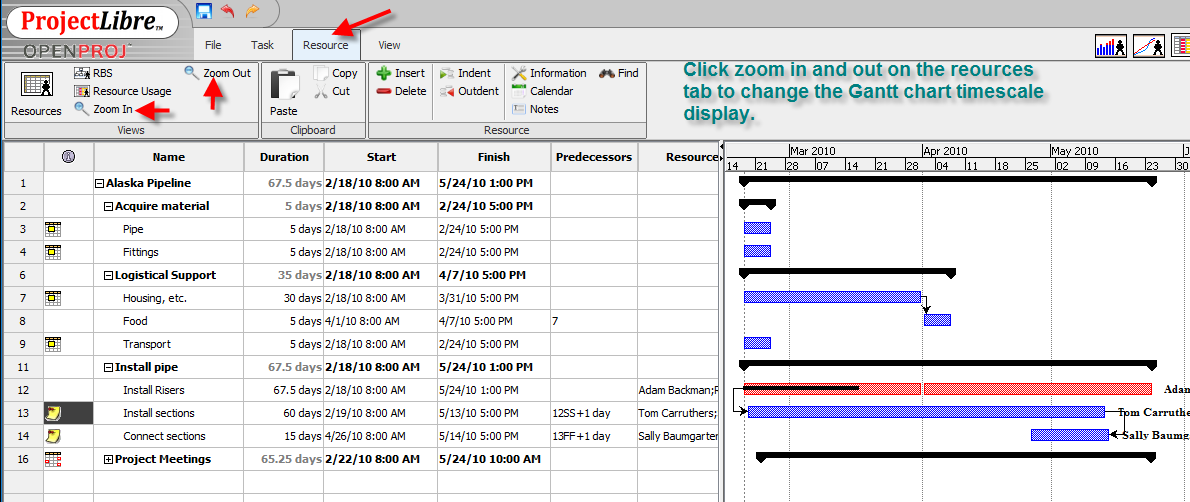
We are going to develop a new Project course based on the open source Project Libre. As with Python we did not find any suitable courseware manuals so we are developing our own. I downloaded Libre the other day and opened up one of our little Microsoft Project exercise files. As advertised it opened perfectly in Project Libre. Right away I noticed little differences: no auto-schedule/manual schedule, no dropdowns for duration, no question mark in the duration column, etc. The one that that was a little annoying was the lack of an obvious way to change the timescale in the Gantt chart. After a little searching on the internet I found one way is to use the zoom in and out commands on the resource tab. By the way, notice I said tab. Project Libre uses the same now familiar Icon Bar user interface that Microsoft Office uses. Below is a screenshot for changing the timescale.

Subscribe to:
Posts (Atom)